ASK – WordPress Creation Course
Useful Links to Sites & Apps
ASK LMS
TRAQOM
ASK Survey
Google Review
Attendance QR
AI Text Tool
Qwen
Design Platform
Canva
Free Images
Pexels
AI Images
Gemini
Course Materials
Installing WordPress on cPanel:
Divi Tutorial for Beginners:
Creating Forms with Divi theme:
Popups for Divi Tutorial:
Divi theme customiser:
Integrate Mailchimp with Divi:
Extract Information from Email to Google Sheet:
Google Analytics 4 (Code) Set up:
Facebook Pixels Set up:
Individual Project Template Download
IP Project Sample (for reference ONLY)
Divi Theme Download
Migration Plugin
All-in-one Migration Plugin Download
All-in-one Migration ftp Extension Plugin Download
Note: Please download, install and activate the above 2 plugins. DO NOT update the plugins. You can then proceed to export and import the wpress extension file.
- AI Website Building
- Logo Creation:
- Remove background and replace background (with template)
- Free Images/ Videos:
Useful Codes:
Copyright © 2026 Company Name | <a href=”/terms-of-use” target=”_blank”>Terms of Use</a> | <a href=”/privacy-policy” target=”_blank”>Privacy Policy</a>
Course Activities
Summary & Examples (for Learning & References ONLY)
Common Business & User Requirements of a Website
Identifying business and user requirements for a WordPress website project involves understanding both the goals of the business and the needs of the users who will interact with the website. Here’s a breakdown of typical requirements in these two categories:
Business Requirements
- Purpose and Goals:
- What is the primary objective of the website (e.g., e-commerce, blogging, portfolio, corporate presence)?
- Are there specific business goals like increasing sales, improving brand awareness, or generating leads?
- Target Audience:
- Who is the primary audience for the website?
- Understanding demographics, interests, and online behavior of the target audience.
- Content Management:
- Need for a user-friendly content management system (CMS).
- Frequency and volume of content updates.
- Design and Branding:
- Consistency with existing branding elements (logos, color schemes).
- Desired look and feel of the website.
- Functionality and Features:
- Specific functionalities required (e.g., shopping carts, forums, booking systems).
- Integration with other tools or platforms (CRM, payment gateways, social media).
- SEO and Marketing:
- Search Engine Optimization (SEO) strategies.
- Integration with marketing tools and analytics.
- Budget and Timeline:
- Financial resources available for the project.
- Project timeline and key milestones.
- Maintenance and Support:
- Plans for ongoing website maintenance and updates.
- Technical support requirements.
User Requirements
- User Experience (UX):
- Intuitive navigation and ease of use.
- Responsive design for optimal viewing on various devices.
- Content Relevance and Quality:
- Relevance, accuracy, and quality of the content provided.
- Engaging and valuable content for the target audience.
- Performance and Speed:
- Fast loading times.
- Efficient performance across different browsers and devices.
- Accessibility:
- Compliance with accessibility standards (e.g., WCAG).
- Readable fonts, color contrast, keyboard navigation, etc.
- Security:
- Protection of user data and privacy.
- Secure transactions if e-commerce is involved.
- Interactivity and Engagement:
- Features that encourage user interaction (comments, reviews, social media sharing).
- Regular updates and fresh content to keep users returning.
- Feedback and Support:
- Easy ways for users to provide feedback or get support.
- Contact forms, live chat, FAQs, or help centers.
By clearly defining these requirements, you can ensure that the WordPress website will meet both the business objectives and provide a positive experience for its users. It’s important to revisit and refine these requirements as needed throughout the project lifecycle.
What are the purpose and key features of a business website?
The purpose and key features of a business website can vary depending on the nature and needs of the business. However, there are some common purposes and features that are generally important across a wide range of business websites:
Purpose of a Business Website
- Online Presence and Branding: Establishing a digital identity and increasing brand visibility. A website acts as the online face of a business, communicating its brand, values, and mission.
- Marketing and Promotion: Using the website as a tool for marketing products or services, and for sharing news, updates, and special offers.
- Sales and E-commerce: For businesses selling products or services, a website can function as an online store, allowing customers to browse, order, and pay online.
- Customer Engagement and Support: Providing a platform for engaging with customers, offering support, and building relationships through interactive features like chat, forums, or feedback forms.
- Information Resource: Offering valuable information about products, services, and related topics, which helps in educating and informing customers.
- Lead Generation: Capturing leads through contact forms, newsletters, and other calls to action.
- Competitive Advantage: Standing out in the industry by showcasing expertise, unique selling points, and customer testimonials.
Key Features of a Business Website
- Homepage: The front page that introduces the business, its value proposition, and main navigation.
- About Us Page: Provides background information about the business, its history, team, and values.
- Products/Services Pages: Detailed pages about the products or services offered, often with pricing, specifications, photos, or videos.
- Contact Information: Essential details like physical address, phone number, email address, and a contact form.
- Testimonials and Reviews: Showcasing customer feedback and success stories to build trust and credibility.
- Blog or News Section: Regularly updated content related to the business, industry news, tips, or educational material.
- Search Functionality: Allowing users to easily search for specific content or products on the site.
- Mobile Responsiveness: Ensuring the website is easily navigable and visually appealing on mobile devices.
- SEO Optimization: Structuring the website and its content to rank well in search engine results.
- Social Media Integration: Links to social media profiles and features for sharing content directly from the website.
- Security Features: Implementing SSL certificates, secure payment gateways, and data protection measures.
- Call-to-Action (CTA) Buttons: Encouraging user interaction or conversion, like “Buy Now”, “Sign Up”, or “Contact Us”.
- Analytics and Tracking: Tools to monitor website traffic, user behavior, and other key performance indicators.
- Accessibility Features: Ensuring the website is accessible to all users, including those with disabilities.
Each business will prioritize these features differently based on its specific goals, target audience, and industry standards. The key is to create a user-friendly, informative, and engaging website that effectively supports the business’s objectives.
What are some of the WordPress design standards, methods and best practices?
WordPress design standards, methods, and best practices are essential for creating a professional, efficient, and user-friendly website. Here’s a list covering various aspects of WordPress design:
Design Standards
- Responsive Design: Ensure the website is mobile-friendly and looks good on all devices and screen sizes.
- Consistent Branding: Use colors, fonts, and layouts that align with the business’s brand identity.
- Readability: Choose fonts and sizes that are easy to read. Maintain good contrast between text and background.
- Navigation: Implement clear and intuitive navigation. Menus should be easy to find and use.
- Accessibility: Design for accessibility, following WCAG guidelines. This includes color contrast, keyboard navigation, alt text for images, and more.
- Image Optimization: Use high-quality images but optimize them for fast loading. Consider the use of lazy loading for images.
- Minimalism: A clean, uncluttered design can improve user experience and load times.
Methods
- Use of Themes: Choose a reliable, well-coded theme that suits your design needs. Child themes can be used for customization.
- Page Builders: Tools like Elementor, Beaver Builder, or Divi can be used for drag-and-drop design customization.
- Custom CSS: Use custom CSS for more control over the design. Add it through the customizer or a child theme.
- Template Hierarchy: Understand WordPress template hierarchy for effective theme customization.
- Widget-Ready Areas: Utilize widgets and widget-ready areas for flexible design elements.
Best Practices
- Keep WordPress Updated: Regularly update WordPress, themes, and plugins for security and functionality.
- Optimize for Speed: Use caching plugins, optimize image sizes, and minimize HTTP requests for better performance.
- SEO Optimization: Use SEO-friendly URLs, proper heading tags, and SEO plugins like Yoast or All in One SEO.
- Regular Backups: Implement a system for regular backups to prevent data loss.
- Security Measures: Use security plugins, strong passwords, and implement SSL to protect your site.
- Cross-Browser Compatibility: Test your site on different browsers to ensure consistent performance.
- Analytics Integration: Use tools like Google Analytics to track website performance and user behavior.
- User Feedback: Consider user feedback for design improvements. Tools like heatmaps can be insightful.
- Content Hierarchy: Use a clear hierarchy in content layout, with headings and subheadings.
- Regular Maintenance: Regularly check your website for broken links, outdated content, and performance issues.
- Scalability: Design with growth in mind. The website should be scalable as the business or traffic grows.
- Legal Compliance: Ensure compliance with legal requirements like GDPR for user data protection.
By adhering to these standards, methods, and best practices, you can create a WordPress website that is not only aesthetically pleasing but also functional, user-friendly, and secure.
Design tools, themes and plugins for common website development
Design Tools
- Canva: An excellent platform for creating custom graphics, Canva is user-friendly and offers a wide range of templates and design elements. It’s ideal for creating visuals for your website, like banners, blog graphics, and social media posts.
- Adobe Creative Suite: For more advanced graphic design needs, tools like Adobe Photoshop and Illustrator are excellent. They offer more sophisticated features for image editing and graphic creation.
- Sketch: A vector-based design tool primarily used for web and mobile UI/UX design. It’s a great tool for designing mockups and wireframes.
Design Themes & Colour theme
| Design Theme | Key Characteristics |
| Minimalist Design | Simple, functional, limited colour palette, ample white space, minimal graphics |
| Flat Design | Two-dimensional look, simple elements, solid colors, straightforward typography |
| Material Design | Grid-based layouts, responsive animations, depth effects like lighting and shadows |
| Vintage or Retro Style | Elements from historical styles, vintage color palettes, typography, and imagery |
| Modern and Contemporary | Bold colours, high contrast, large images, innovative layouts, latest web technologies |
| Illustrative Design | Hand-drawn illustrations, icons, and graphic elements, artistic image |
| Typography-Driven Design | Focus on font selection, creative use of typeface, size, and arrangement |
| Photographic Content | Heavy reliance on high-quality photography as the main design element |
| Parallax Scrolling | Background moves at a slower rate than the foreground, creating a 3D effect during scrolling |
| Dark Mode Design | Dark background colours with light text, reduces eye strain in low-light conditions, saves battery on mobile |
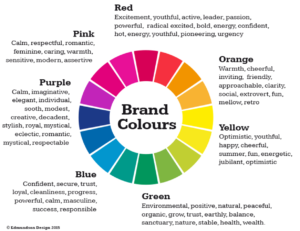
Essential Plugins
- Yoast SEO: This plugin is essential for optimizing your WordPress site for search engines. It helps with creating better content, improving readability, and ensuring your pages are SEO-friendly.
- Click to Chat: Allows you to integrate WhatsApp chat functionality into your website, making it easy for visitors to contact you directly.
- UpdraftPlus: A must-have for backups, UpdraftPlus allows you to schedule automatic backups and store them on various cloud services.
- Solid Security: Provides robust security features like firewall protection, malware scan, and login security to protect your website from threats.
- Popups for Divi: Enhance your Divi site with custom popups. Great for promotions, announcements, or newsletter signups.
- WPForms: A user-friendly form builder for creating contact forms, feedback forms, subscription forms, and more. It’s intuitive and integrates well with various services.
Additional Plugin Recommendations
- WooCommerce: If you’re looking to add e-commerce functionality, WooCommerce is the go-to plugin. It’s customizable and can integrate with a variety of payment gateways.
- Akismet Anti-Spam: Essential for blocking spam in comments and contact forms, keeping your site clean and professional.
- W3 Total Cache: Improves website speed and performance through caching. Essential for enhancing user experience and SEO.
- Smush: Optimizes images on your website, reducing file sizes without losing quality, thus improving load times.
- MonsterInsights: Connects your website with Google Analytics, making it easier to track website traffic and user behavior directly from your WordPress dashboard.
- Gravity Forms: For more advanced form-building needs, Gravity Forms offers extensive features and integrations.
By combining these design tools, themes, and plugins, you can create a WordPress website that is not only visually appealing and aligned with your brand but also optimized for performance, user experience, and search engines. Remember to always keep your themes and plugins updated for security and performance reasons.
How do you develop a WordPress website design blueprint for a website?
Creating a WordPress website design blueprint involves outlining the structure, layout, and key components of the website. This blueprint serves as a guide for the development process, ensuring all essential elements are included and organized effectively. Below is a detailed blueprint:
1. Website Structure
Homepage
- Header: Includes logo, navigation menu, and contact information.
- Hero Section: A large banner image or slider with a call-to-action (CTA).
- About Us Snippet: Brief introduction to the business or service.
- Services/Product Overview: Highlight main offerings with links to detailed pages.
- Testimonials/Reviews: A section for customer feedback.
- Blog/News Teaser: Latest blog posts or news updates.
- Footer: Contains contact details, social media links, quick links to important pages, and newsletter signup.
About Us Page
- Detailed company background.
- Team member profiles.
- Mission and vision statements.
Services/Products Page
- Individual pages for each service or product.
- Detailed descriptions, pricing, and images or videos.
Blog
- Regularly updated articles or news.
- Categories and tags for easy navigation.
- Comment section for user engagement.
Contact Page
- Contact form using WPForms.
- Google Maps integration.
- Contact details and operational hours.
2. Layout and Design
- Theme: Divi theme for a flexible and customizable layout.
- Color Scheme: Align with brand colors; ensure good contrast for readability.
- Typography: Consistent and web-friendly fonts.
- Responsive Design: Ensure the website is mobile-friendly.
- Accessibility: Follow WCAG guidelines for accessibility.
3. Key Components
Navigation
- Clear and intuitive menu structure.
- Sticky navigation header for easy access.
Content
- Engaging and high-quality content.
- Use Canva for custom graphics and images.
- Videos and infographics where applicable.
Call to Action
- Prominent CTA buttons on the homepage and relevant pages.
- Newsletter signup form in the footer.
SEO
- Use Yoast SEO for on-page optimization.
- Structured URLs, meta tags, and alt text for images.
Social Media Integration
- Links to social media profiles.
- Social sharing buttons on blog posts.
E-commerce Components (if applicable)
- Product catalog with filters.
- Shopping cart and checkout process.
- Secure payment gateway integration.
Security and Performance
- Use Wordfence for security measures.
- Implement caching with W3 Total Cache for performance.
- Regular backups with UpdraftPlus.
Interactivity
- Click to Chat for instant communication.
- Popups for Divi for special announcements or offers.
4. Additional Features
- Multi-language support if required.
- Analytics integration with Google Analytics for visitor tracking.
- Custom 404 page for a better user experience.
5. Maintenance Plan
- Regular updates for WordPress, themes, and plugins.
- Ongoing SEO optimization and content updates.
- Performance monitoring and adjustments.
This blueprint provides a comprehensive structure for a WordPress website, ensuring a balance between aesthetics, functionality, and user experience. It’s adaptable to specific business needs and can be scaled or modified as required.
What are the essential components to create a website?
The 3 essentials/ components to a website are:
1. Domain name
2. Hosting
3. Web application framework
1. Domain Name
- Description: A domain name is your website’s address on the internet. It’s a unique name that visitors type into the browser’s URL bar to visit your site. A good domain name should be memorable, easy to spell, and often reflects the name of the business or the content of the website.
- Examples:
- .com: The most common and versatile domain, used by businesses worldwide.
- .org: Often used by non-profits, NGOs, and educational platforms.
- .net: Initially intended for network technologies but now a general-purpose domain.
- Country-Specific Domains: Like .uk (United Kingdom), .ca (Canada), which are good for targeting a local audience.
- Service Providers:
- GoDaddy: A well-known domain registrar offering a wide range of domain extensions.
- Namecheap: Known for affordable pricing and user-friendly interface.
- Google Domains: Offers seamless integration with other Google services.
2. Hosting
- Description: Web hosting services provide the technology and server space for your website to be accessible on the Internet. They store your site’s files, handle traffic, and ensure that your site is available to visitors at all times.
- Types:
- Shared Hosting: Affordable, hosting multiple sites on a single server. Good for small to medium sites.
- VPS Hosting: Offers more power and flexibility; sites are hosted on the same server but with set amounts of resources.
- Dedicated Hosting: A server dedicated solely to your site. Ideal for large, resource-intensive websites.
- Cloud Hosting: Offers scalability and is ideal for sites with fluctuating traffic.
- Service Providers:
- Bluehost: Popular for shared and WordPress hosting.
- HostGator: Offers a variety of hosting options with good customer support.
- AWS (Amazon Web Services): Provides reliable cloud hosting services.
3. Web Application Framework
- Description: A web application framework provides a structure for building websites. It includes tools, libraries, and technologies that simplify the development process and support content management.
- Examples:
- WordPress: The most popular content management system, ideal for blogs, small to medium businesses, and even e-commerce.
- Joomla: Known for its flexibility and suitable for both simple and complex sites.
- Drupal: Offers robust security features, suited for complex, resource-heavy websites.
- Shopify: A dedicated e-commerce platform for online stores.
- Squarespace: Known for its sleek templates and intuitive website builder, great for portfolios and small businesses.
- Service Providers:
- WordPress.org: Offers free, open-source software for building websites.
- Wix: A website builder with a drag-and-drop interface, suitable for beginners.
- Adobe Dreamweaver: A tool for designing and coding custom websites.
Each of these components plays a vital role in the creation and operation of a website. Choosing the right providers and platforms based on your specific needs, such as the size of your website, expected traffic, and the level of customization required, is crucial to the success of your online presence.
What are the Pros and Cons of using WordPress for your website
| Pros | Cons |
|---|---|
| User-Friendly – WordPress is known for its easy-to-use interface, making it accessible for beginners. | Security – Being the most popular CMS, it’s a frequent target for hackers. Regular updates are necessary for security. |
| Customizable – A wide range of themes and plugins allow for extensive customization. | Performance – With many plugins and customizations, the site can become slow and require additional optimization. |
| SEO-Friendly – Offers many SEO tools to help websites rank higher in search engines. | Updates – Frequent updates can be overwhelming and might break the site if not managed properly. |
| Large Community – Extensive community support for troubleshooting and development. | Plugin Compatibility – Not all plugins are always compatible with each other or with the latest version of WordPress. |
| Cost-Effective – WordPress itself is free, and many plugins and themes are available at no cost. | Customization Requires Code – Advanced customization may require knowledge of HTML, CSS, and PHP. |
| Multilingual Support – Supports many languages, which is beneficial for international sites. | Standardized Look – Many sites can end up looking similar due to the use of common themes. |
| Responsive Design – Most themes are mobile-friendly and responsive out of the box. | Maintenance – Requires regular maintenance to keep the site running smoothly. |
| Regular Updates – Continuously improved with new features and security updates. | Scalability – While scalable, it requires significant effort and resources to handle very high traffic loads. |
| Content Management – Intuitive content creation and management tools. | Overhead – Additional unused features from themes or plugins can add overhead. |
| E-Commerce Solutions – Integration with WooCommerce and other e-commerce platforms. | Learning Curve – While user-friendly, there is still a learning curve for |
How to choose a WordPress theme and how it may impact website usability
The choice of a WordPress theme can significantly impact website usability in various ways. Here are some key aspects:
1. Layout and Navigation
- Effect: A theme dictates the site’s layout and navigational structure. A well-organized layout with intuitive navigation enhances user experience.
- Example: A theme with a clear, top navigation bar makes it easier for users to find important sections, like ‘About Us’, ‘Services’, or ‘Contact’.
2. Responsiveness
- Effect: Responsive themes adapt to different screen sizes, ensuring that the website is usable on desktops, tablets, and smartphones.
- Example: A responsive theme will reorganize content for a mobile screen, making text readable without zooming and clickable elements easily accessible.
3. Loading Speed
- Effect: Themes with heavy graphics or inefficient coding can slow down your website, negatively affecting user experience and search engine rankings.
- Example: A lightweight theme with optimized images and code will load faster, keeping visitors engaged.
4. Readability
- Effect: The theme’s font choices, color contrasts, and spacing affect the readability of your content.
- Example: A theme with high contrast between text and background and a legible font improves readability, especially for longer blog posts or articles.
5. Accessibility
- Effect: Themes that follow web accessibility guidelines ensure that your site is usable by people with disabilities.
- Example: A theme with keyboard navigation support and alt text for images is more accessible to users with visual impairments.
6. Customization Options
- Effect: Themes with flexible customization options allow you to tailor the user experience to match your brand and audience needs.
- Example: A theme with customizable color schemes and widget areas lets you design a unique and user-friendly website interface.
7. Compatibility with Plugins
- Effect: Some themes may not be compatible with all plugins, which can limit functionality and affect user experience.
- Example: A theme that is incompatible with a popular SEO plugin might hinder your site’s search engine performance.
Selecting a WordPress theme is more than just about aesthetics; it’s about ensuring functionality, performance, and a positive user experience. It’s important to consider these factors to ensure that the theme aligns with the goals and needs of your website and its audience.
What is the use of Plugins in WordPress? How do Plugins affect operations and usability?
Plugins play a crucial role in enhancing both the operations and usability of WordPress websites. Here’s a brief overview:
Role of Plugins in WordPress
- Functionality Enhancement: Plugins extend the basic functionalities of WordPress, allowing website owners to add specific features without needing to code them from scratch.
- Customization: They offer customization options to meet diverse needs, making it easier to tailor a website to specific requirements or preferences.
- Efficiency and Productivity: Plugins can automate many tasks (like SEO optimization, backups, or spam filtering), saving time and improving efficiency.
- User Experience Improvement: Many plugins are designed to enhance the user experience, such as by improving website speed, adding contact forms, or creating more engaging visuals.
- Security: Security plugins help in safeguarding the website from hacking attempts, malware, and other security threats.
Examples of Plugins and Their Uses
- Yoast SEO: Enhances SEO efforts, making it easier to optimize website content for search engines.
- WooCommerce: Transforms a WordPress site into a fully functional e-commerce store, complete with product listings, shopping cart, and checkout processes.
- Jetpack: Offers a suite of features including site security, performance enhancements, and visitor engagement tools.
- Akismet: Helps in managing and filtering out spam comments, keeping the website cleaner and more professional.
- WPForms: Allows users to easily create contact forms, surveys, and other interactive forms, improving visitor engagement.
- WP Rocket: A caching plugin that speeds up website loading times, enhancing the user experience.
- Wordfence Security: Provides firewall and malware scan services to protect WordPress websites from security threats.
In summary, plugins are essential for expanding the capabilities of WordPress sites, offering customization, enhancing user experience, and ensuring operational efficiency and security. They are key to transforming a basic WordPress site into a powerful, feature-rich web platform.
How to choose a hosting provider and how it affects operations and usability.
The choice of a hosting provider has a significant impact on WordPress operations and usability in several ways:
1. Website Speed and Performance
- Effect: A good hosting provider offers optimized server configurations for WordPress, ensuring faster loading times and smoother performance.
- Example: Hosting services like WP Engine or SiteGround offer WordPress-specific hosting that enhances website speed and performance.
2. Uptime and Reliability
- Effect: Reliable hosting ensures that your website is consistently available to users, minimizing downtime.
- Example: Bluehost and HostGator are known for their reliable uptime, ensuring that WordPress sites are accessible most of the time.
3. Security
- Effect: A hosting provider with strong security measures protects your WordPress site from threats like hacking and malware.
- Example: Hosts like Kinsta provide automatic backups, malware scanning, and other security features specifically for WordPress sites.
4. Scalability
- Effect: As your WordPress site grows, you need a host that can scale its resources to match increased traffic and content.
- Example: Cloud hosting solutions like AWS or Google Cloud offer scalable resources for growing WordPress websites.
5. Customer Support
- Effect: Good customer support can be crucial for resolving WordPress-specific issues quickly.
- Example: Many WordPress-focused hosts offer specialized support with extensive knowledge of WordPress-related issues.
6. WordPress Integration and Management
- Effect: Some hosts offer one-click WordPress installations and management tools, simplifying the setup and maintenance of your site.
- Example: DreamHost and SiteGround offer easy WordPress installation and management tools, making it user-friendly for beginners.
In summary, the hosting provider you choose influences key aspects of your WordPress site, like speed, uptime, security, and scalability. Opting for a host that offers WordPress-optimized services can greatly enhance the overall efficiency and user experience of your website.
Case study of a F&B restaurant upgrading a website
Title: Enhancing Digital Presence in the F&B Industry: A Case Study on Website Revitalisation
Background: In the competitive field of the Food and Beverage industry, a local gourmet restaurant sought to upgrade its digital footprint. The primary objective was to overhaul their existing WordPress website to better reflect the quality and uniqueness of their culinary offerings.
Challenges: The restaurant’s management emphasised the importance of a visually appealing website design. They envisaged a WordPress theme with elaborate animations to mirror the restaurant’s ambiance and culinary finesse. Additionally, functional requirements included integrating a reservation booking system and creating a blog section for recipe sharing. The management also contemplated incorporating a database optimisation plugin to enhance website performance.
Revamping a WordPress website for a gourmet restaurant requires a careful balance between aesthetic appeal and functionality. Here’s a detailed analysis of the potential impact of using a visually stunning theme with intricate animations and the role of a database optimisation plugin:
Impact of a Visually Stunning Theme with Intricate Animations
- Pros:
- Attractiveness: An attractive theme can immediately grab the attention of visitors, making a strong first impression.
- Brand Representation: High-quality, intricate animations can reflect the sophistication and quality of the restaurant, aligning with its branding.
- Engagement: Engaging visuals can enhance user experience, encouraging visitors to explore more content, such as the menu, chef’s background, and special offers.
- Cons:
- Loading Time: Complex animations can significantly slow down the site’s loading time, negatively impacting user experience and SEO.
- Mobile Responsiveness: Some animations may not work well or look good on mobile devices, which can be a major drawback since a significant portion of users browse on smartphones.
- Accessibility Issues: Overly intricate designs can be problematic for users with disabilities, impacting the website’s accessibility.
Role of a Database Optimisation Plugin
- Performance Enhancement: A database optimisation plugin can significantly improve website performance by cleaning up redundant data, optimising tables, and reducing server load.
- Faster Loading Times: Improved database performance can lead to faster page loading times, which is crucial for retaining visitors and improving the user experience.
- Better Scalability: As the website grows (e.g., more blog posts, increased traffic), database optimisation becomes vital for maintaining smooth operations.
Balancing Design and Functionality
- Optimise Animations: Choose animations that are visually appealing but not overly complex. Ensure they are well-optimised to minimise impact on loading times.
- Test Across Devices: Regularly test the website on various devices and browsers to ensure compatibility and responsiveness.
- Accessibility Considerations: Include alternative text for animations and ensure that the website is navigable without relying solely on visual cues.
- Regular Database Maintenance: Utilise the database optimisation plugin regularly to keep the website running smoothly, especially important for the reservations and blog sections.
- Use Caching and CDN: Implement caching solutions and a Content Delivery Network (CDN) to reduce loading times and balance the load caused by high-quality images and animations.
- Monitor Performance Metrics: Regularly check the website’s performance metrics to understand the impact of design choices and make adjustments as needed.
- Feedback Loop: Collect feedback from users about their experience and make adjustments to the design and functionality based on this feedback.
Conclusion
While the allure of a visually stunning website is undeniable, especially for a gourmet restaurant aiming to showcase its culinary expertise and ambiance, it’s essential to consider the potential drawbacks in terms of usability and performance. Balancing these elements involves a strategic approach to design, regular performance monitoring, and leveraging tools like database optimisation plugins and caching solutions to ensure that the website remains both beautiful and functionally efficient.
Case Study: Balancing Advanced Features with Budget Constraints in WordPress Website Development
Case Study: Balancing Advanced Features with Budget Constraints in WordPress Website Development
Context: A client approached our web development team with a request for a custom WordPress website. The desired features were ambitious, including e-commerce integration, real-time chat support, and elaborate animations. However, the project was constrained by a limited budget.
Challenge: The primary challenge was to evaluate and manage the trade-offs involved in implementing these complex features within the WordPress platform, considering the limited financial resources. Key considerations included the impact of these features on the website’s overall functionality, interoperability with other systems, efficiency in terms of load times and user experience, and the cost implications of development and maintenance.
Creating a WordPress website with advanced features such as e-commerce capabilities, real-time chat support, and complex animations within a tight budget involves careful evaluation of various trade-offs. Here’s how you can approach this:
1. Functionality vs. Budget
- E-commerce Capabilities: WordPress offers numerous e-commerce plugins like WooCommerce, which are cost-effective. However, customizing these plugins for specific needs can increase costs.
- Real-time Chat Support: There are free and paid chat support plugins available. The free versions usually offer limited functionalities. Advanced features like AI-driven chatbots or extensive customization can be expensive.
- Complex Animations: While animations enhance user experience, they require more development time and potentially more sophisticated hosting solutions to maintain performance, which can escalate costs.
2. Interoperability
- Ensure that all chosen plugins and custom features work seamlessly together. Incompatibilities between different components can lead to increased troubleshooting and maintenance costs.
- Opt for plugins and themes known for their compatibility with a wide range of WordPress tools.
3. Efficiency
- Complex features can impact website loading times. Optimize images and animations to maintain website speed.
- Use lightweight plugins and clean coding practices to prevent bloat and ensure efficient performance.
4. Cost Optimization Strategies
- Prioritize Features: Determine which features are essential and which can be scaled down or omitted.
- Open Source and Free Plugins: Explore free or open-source alternatives before considering premium options.
- Phased Implementation: Roll out the website in phases, starting with basic functionality. Gradually add complex features as budget allows.
- Pre-Built Themes and Templates: Use pre-built themes that closely match the desired design, reducing the need for extensive customization.
5. Client Communication
- Discuss the implications of each feature with the client, including ongoing maintenance costs.
- Provide clear options with different price points and functionalities, helping the client make informed decisions.
6. Long-Term Considerations
- Consider the long-term maintenance and scalability of the site. What works within a tight budget now might incur higher costs in the future for updates and scalability.
Conclusion
Balancing intricate features with a tight budget requires a strategic approach, focusing on essential functionalities, using cost-effective solutions, and planning for long-term sustainability. Clear communication with the client about the trade-offs involved is key to ensuring their needs are met within the budget constraints.